This is the abridged developer documentation for cwsweep
# cwsweep
> A Rust CLI that inventories CloudWatch Logs across an entire AWS Organization and safely deletes or changes the retention of interactively selected log groups.
## See it in action [Section titled “See it in action”](#see-it-in-action) Your browser does not support video playback. [Download the video](/videos/cwsweep-intro-en.mp4). cwsweep in 60 seconds Inventory the whole Organization Starting from the management account’s credentials, cwsweep assumes a role into every member account and aggregates log groups in the regions you specify. Dry-run by default Unless you explicitly pass `--execute`, `delete-log-group` and `put-retention-policy` are never called. Double identity verification The account ID is verified with `sts:get-caller-identity` twice: at scan time and again right before execution. Audit log is always written Every deletion and retention change is recorded in a JSON Lines audit log, and any operation whose log entry cannot be written is aborted.
# Getting started
> Installing cwsweep and running your first scan.
Your browser does not support video playback. [Download the video](/videos/cwsweep-howto-en.mp4). How to use cwsweep (2-minute walkthrough) ## Installation [Section titled “Installation”](#installation) Download the binary for your platform (Linux / macOS, x86_64 / arm64) from [GitHub Releases](https://github.com/hideokamoto/cwsweep/releases). To build from source, install Rust 1.94.1 or later and run:
```bash
cargo install --git https://github.com/hideokamoto/cwsweep --locked
```
## Prerequisites [Section titled “Prerequisites”](#prerequisites) * Run cwsweep with the credentials of the AWS Organizations **management account**. cwsweep does not assume a role into the management account itself; it uses your current credentials as is. * cwsweep assumes a role into each member account. The default role name is `OrganizationAccountAccessRole`, which you can override with `--role-name`. * Only the AWS standard partition (`aws`, commercial regions) is supported. See [Scope](/reference/scope/) for details. ## Your first scan [Section titled “Your first scan”](#your-first-scan) Start with the read-only `scan` subcommand. `scan` prints log groups as a table and exits; it has no code path that can reach deletion or retention changes.
```bash
cwsweep scan --regions us-east-1,us-west-2
```
## What it looks like [Section titled “What it looks like”](#what-it-looks-like) The screenshots below were recorded against a local fake AWS environment, so the account IDs are fictional. `scan` lists every log group across all accounts and regions in one table, largest first. 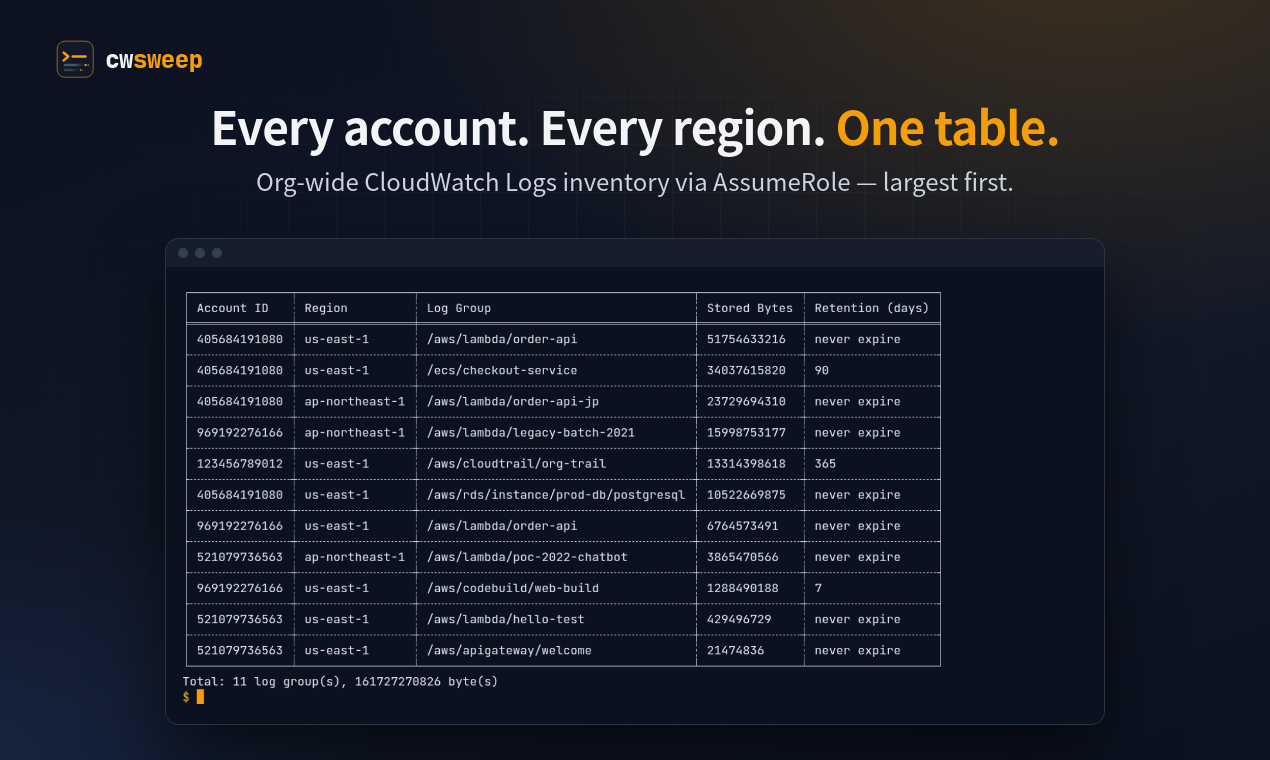 `clean` runs as a dry-run by default. You pick the targets (nothing is pre-selected), then cwsweep prints the exact plan and skips every change. 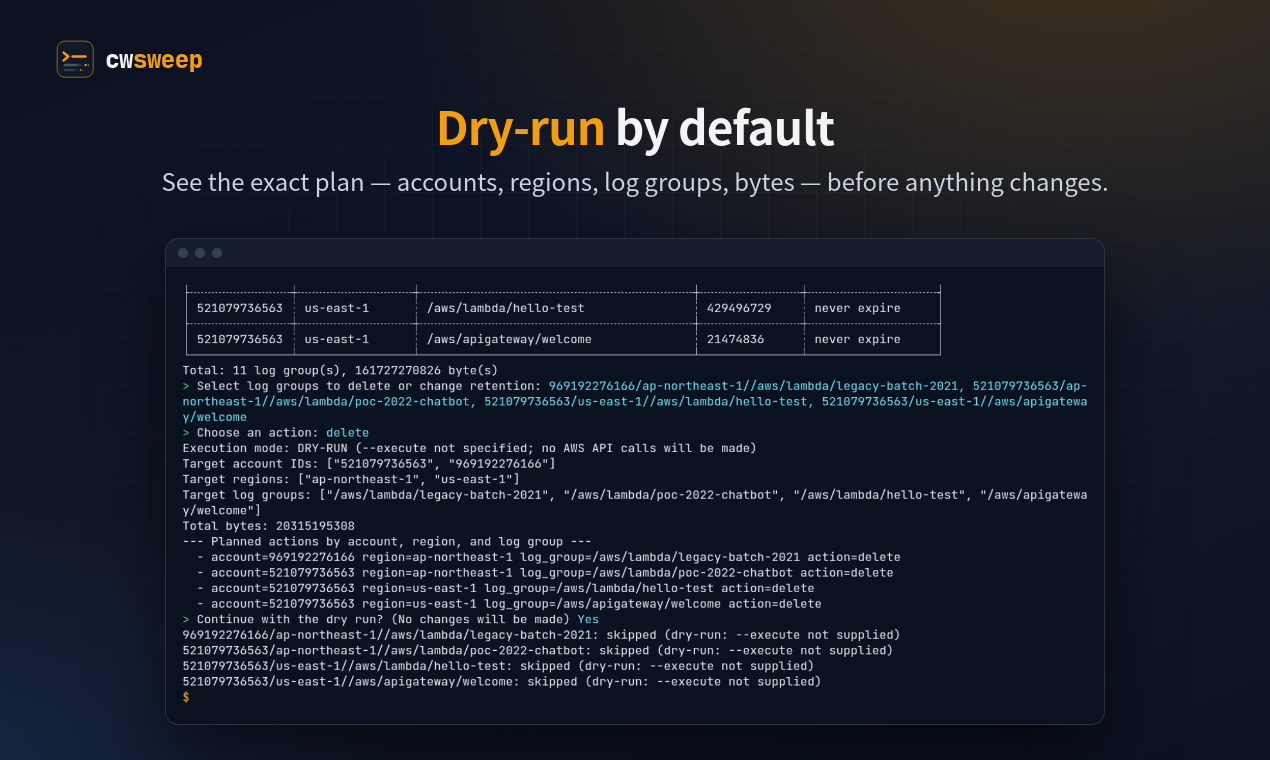 Pass `--execute` to apply the plan. Each account is re-verified with STS before anything is changed. 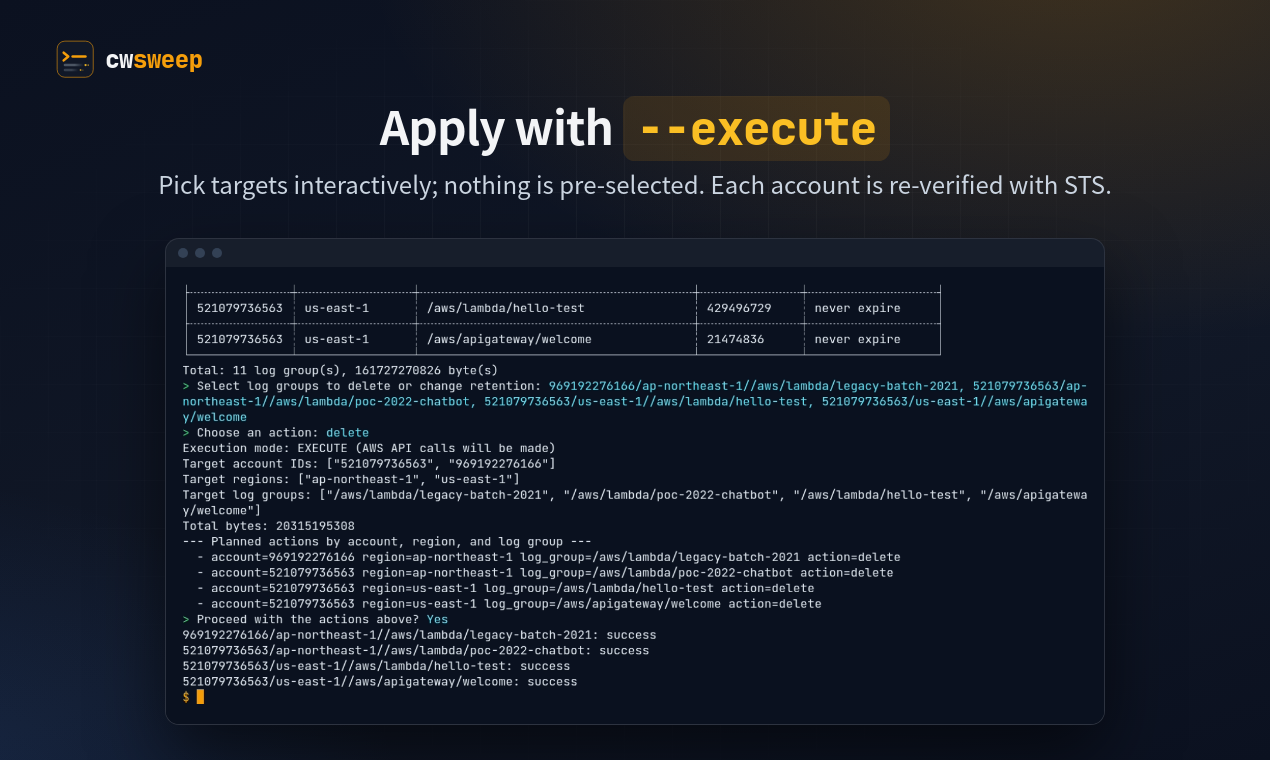 Scan again to confirm the result. You can also set one retention period everywhere with [`retention set`](/guides/retention/). 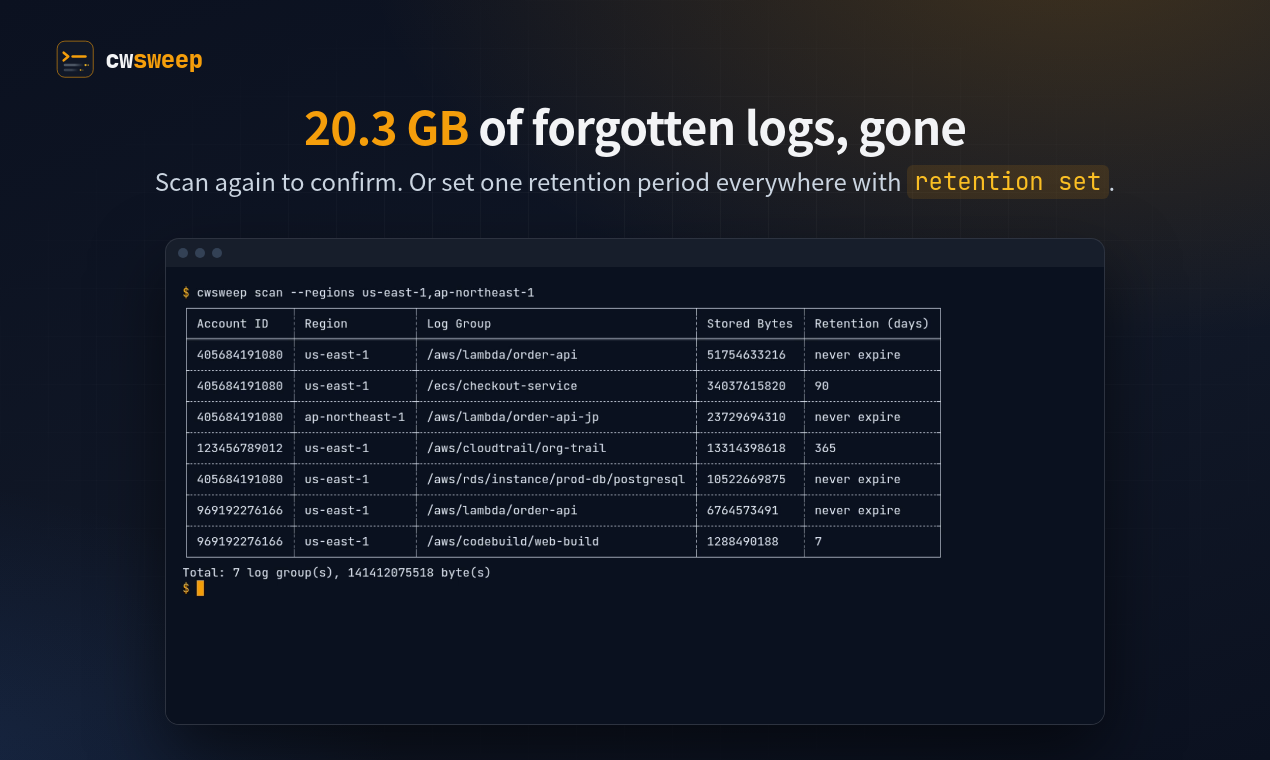 ## Subcommands [Section titled “Subcommands”](#subcommands) | Subcommand | Purpose | Writes to AWS | | ------------------------------------- | ------------------------------------------------------------- | ------------------------------------- | | [`scan`](/guides/scan/) | Inventory (display only) | No | | [`clean`](/guides/clean/) | Interactively select log groups to delete or change retention | Only with `--execute` | | [`retention set`](/guides/retention/) | Set the same retention period on all log groups | Only with `--execute` (never deletes) | | [`audit`](/guides/audit/) | View the audit log | No (does not connect to AWS) | Invoking cwsweep without a subcommand is an error.
# Agent Skill and llms.txt
> Install the cwsweep Agent Skill, and find the llms.txt and skill endpoints published by this site.
cwsweep ships an [Agent Skill](https://agentskills.io/specification) that teaches a coding agent how to use the CLI safely: always `scan` first, treat dry-run as the default, and hand the `--execute` run to you after you approve it. ## Install [Section titled “Install”](#install)
```bash
npx skills add hideokamoto/cwsweep --skill cwsweep
```
Keep `--skill cwsweep`. This repository also contains other, unrelated skills (the AI-DLC workflow files under `.claude/` and `.cursor/`), and without the flag they are offered too. The skill source is [`skills/cwsweep/SKILL.md`](https://github.com/hideokamoto/cwsweep/blob/main/skills/cwsweep/SKILL.md). When the CLI changes, the skill is updated in the same change, and a test fails if its flags, defaults, or retention values drift from the code. ## What this site publishes [Section titled “What this site publishes”](#what-this-site-publishes) | URL | Content | | ------------------------------------------------------------------------------------------ | ------------------------------------------------------------------------------------------------------------------------- | | [`/llms.txt`](/llms.txt) | An [llms.txt](https://llmstxt.org/) entry point. Every page links to it with ``. | | [`/llms-full.txt`](/llms-full.txt), [`/llms-small.txt`](/llms-small.txt) | The documentation as plain text (complete and abridged). Generated from the English pages. | | [`/skill.md`](/skill.md) | The skill file. | | [`/.well-known/agent-skills/cwsweep/SKILL.md`](/.well-known/agent-skills/cwsweep/SKILL.md) | The same file, at the discovery path. | | [`/.well-known/agent-skills/index.json`](/.well-known/agent-skills/index.json) | A discovery index with the skill’s `name`, `description`, `url`, and a `sha256` digest of the file. | The skill files are read from `skills/` when the site is built; the site keeps no copy. The discovery index follows the [Agent Skills Discovery RFC](https://github.com/cloudflare/agent-skills-discovery-rfc), which is still a draft (v0.2.0 at the time of writing).
# audit — View the audit log
> Display the deletion and retention-change audit log in read-only mode.
```bash
# Show every entry of the audit log at the default path (cwsweep-audit.jsonl) as a table
cwsweep audit
# Specify the path and output format
cwsweep audit --audit-log-path /var/log/cwsweep/audit.jsonl --output json
```
`audit` does not connect to AWS and never modifies the audit log. If the file does not exist, it exits successfully with an empty result. Malformed lines are skipped with a warning on stderr (valid entries before and after them are still shown). Each deletion or retention change produces two entries: an `intent` entry written before the API call and a `result` entry written after it. The `success` value of an `intent` entry is a placeholder (the outcome is not yet known) and is shown as `-` in the table; use the `result` entry to see whether the operation succeeded.
# clean — Select, delete, and change retention
> Delete or change the retention of interactively selected log groups.
`clean` proceeds through scan → interactive selection → confirmation. **Dry-run is the default**: nothing is deleted and no retention is changed unless you explicitly pass `--execute`.
```bash
# Dry-run (default). Goes through scan → interactive selection → confirmation, but never deletes or changes retention
cwsweep clean --regions us-east-1
# Actually delete / change retention (this never happens unless you pass this flag explicitly)
cwsweep clean --regions us-east-1 --execute
# Override the audit log destination (default: cwsweep-audit.jsonl in the current directory.
# There is no option to disable it)
cwsweep clean --regions us-east-1 --audit-log-path /var/log/cwsweep/audit.jsonl
```
* The interactive multi-select always starts with every item unchecked. After selecting, you choose the action: `delete`, or `set-retention` (you then enter the number of days). * The confirmation defaults to No. Before execution, a confirmation screen restates the target account IDs, regions, log group names, and total bytes. * When stdin is not a TTY (pipes, CI, etc.), `clean` prints the scan results, warns that it cannot proceed to interactive selection, and exits successfully. Use [`scan`](/guides/scan/) for inventories in non-interactive environments. * With `--execute`, the account ID is verified again with `sts:GetCallerIdentity` immediately before each operation, and the audit log gets an `intent` line before the API call and a `result` line after it. A dry-run writes nothing to the audit log. See [Safety](/reference/safety/) for the full set of safety mechanisms.
# retention set — Bulk retention
> Set the same retention period on every log group found by the scan (never deletes).
```bash
# Dry-run (default). Goes through scan → confirmation, but put-retention-policy is never called
cwsweep retention set --regions us-east-1 --days 30
# Actually set retention (this never happens unless you pass this flag explicitly)
cwsweep retention set --regions us-east-1 --days 30 --execute
# Override the audit log destination (as with clean, there is no option to disable it)
cwsweep retention set --regions all --days 90 --execute --audit-log-path /var/log/cwsweep/audit.jsonl
```
* `--days` is required. Any value other than the discrete values accepted by CloudWatch Logs (1, 3, 5, 7, 14, 30, 60, 90, 120, 150, 180, 365, 400, 545, 731, 1096, 1827, 2192, 2557, 2922, 3288, 3653) is rejected before connecting to AWS. * Every log group found by the scan is targeted (there is no interactive selection). On a TTY, the target list is shown and you are asked to confirm before execution. On a non-TTY (CI, etc.) only dry-run is allowed; passing `--execute` exits with an error. * There is no code path that reaches `delete-log-group`. It reuses the same safety mechanisms as `clean`: dry-run by default, mandatory audit logging, and double identity verification.
# scan — Inventory
> Inventory log groups in read-only mode.
Prints log groups as a table and exits. It does not proceed to interactive selection or confirmation, and it does not write the audit log.
```bash
cwsweep scan --regions us-east-1,us-west-2
# Switch the output format to JSON (for CLI agents such as Cursor or Claude Code)
cwsweep scan --regions us-east-1 --output json
# Override the role name used when assuming into member accounts (default: OrganizationAccountAccessRole)
cwsweep scan --regions us-east-1 --role-name CustomOrgRole
# Target every region in the commercial partition (case-insensitive).
# The number of target regions is printed to stderr, and on a TTY you are asked to confirm first
cwsweep scan --regions all
# If --regions is omitted, on a TTY you pick regions from a multi-select built from account:ListRegions.
# On a non-TTY (CI/pipes) it exits with an error without connecting to AWS
cwsweep scan
```
## Specifying regions [Section titled “Specifying regions”](#specifying-regions) | Input | Behavior | | --------------------------------------------- | ---------------------------------------------------------------------------------------------------------------------------------------------------------------------------------------------------------------------------------------------------------------------------------------------------------------------------------------------------------------------------- | | `--regions us-east-1,ap-northeast-1` | Targets only the listed regions | | `--regions all` (`ALL` / `All` also accepted) | Calls `account:ListRegions` with the management account’s credentials and targets every enabled region in the commercial partition (`aws`). GovCloud, China regions, and opt-in regions that are not enabled are excluded. If `all` is combined with other values, `all` wins. The count and list are printed to stderr, and on a TTY you are asked to confirm (default: No) | | Omitted, TTY | Pick regions from the same list via an interactive multi-select. Selecting zero regions is an error | | Omitted, non-TTY | Exits with an error asking you to specify `--regions` (does not connect to AWS) | Region selection works the same way for `clean` and `retention set`.
# Logging and troubleshooting
> How errors and verbose logs are displayed, and how to fix common errors.
## Logging and error output [Section titled “Logging and error output”](#logging-and-error-output) * On a fatal error, cwsweep prints a single line `Error: ` to stderr, in red (only when attached to a TTY; no color when piped or redirected). Internal AWS SDK error structures are not dumped. * With `--verbose` (`--debug` is a synonym), detailed logs from the AWS SDK and internal crates (such as how the credential provider was resolved) are written to stderr as is. Without it, these raw logs are suppressed and only cwsweep’s own warnings are shown. `--verbose` / `--debug` work either before or after the subcommand (e.g. `cwsweep scan --verbose` / `cwsweep --debug clean`). * If the `RUST_LOG` environment variable is set, it takes precedence regardless of `--verbose`.
```bash
# To see the details of an authentication error
cwsweep scan --regions us-west-2 --verbose
```
## Common errors [Section titled “Common errors”](#common-errors) ### `WARN profile [xxx] ignored; sections ... must have a prefix i.e. [profile my-profile]` [Section titled “WARN profile \[xxx\] ignored; sections ... must have a prefix i.e. \[profile my-profile\]”](#warn-profile-xxx-ignored-sections--must-have-a-prefix-ie-profile-my-profile) A section in `~/.aws/config` is named `[xxx]`. The AWS SDK requires the `profile` prefix for every profile other than `default`, so rename it to `[profile xxx]` (sections in `~/.aws/credentials` can stay as `[xxx]`). ### `ProfileFile provider could not be built: ... the credentials-login feature must be enabled` [Section titled “ProfileFile provider could not be built: ... the credentials-login feature must be enabled”](#profilefile-provider-could-not-be-built--the-credentials-login-feature-must-be-enabled) Profiles created by `aws login` with a `login_session_arn` require the `credentials-login` feature of `aws-config`. The current source has it enabled, so if you see this error you are running an old binary. Reinstall the latest version.
# Migrating from v0.1
> Mapping from the v0.1 flag-based interface to the v0.2.0 subcommand-based interface.
v0.2.0 removed the top-level flag-based interface in favor of subcommands. The old forms have no compatibility aliases and result in a clap usage error. | v0.1 | v0.2 | | ---------------------------------------- | --------------------------------------------------------------------------------------------------------------------- | | `cwsweep --regions R` | `cwsweep clean --regions R` (proceeds to interactive selection as before) / `cwsweep scan --regions R` (display only) | | `cwsweep --regions R --scan-only` | `cwsweep scan --regions R` | | `cwsweep --regions R --output json` | `cwsweep scan --regions R --output json` | | `cwsweep --regions R --execute` | `cwsweep clean --regions R --execute` | | `cwsweep --regions R --audit-log-path P` | `cwsweep clean --regions R --audit-log-path P` | | (none) | `cwsweep audit [--audit-log-path P] [--output json]` |
# Releases
> Release history of cwsweep, taken from GitHub Releases at build time.
Releases published on [GitHub Releases](https://github.com/hideokamoto/cwsweep/releases), newest first. ## [v0.3.1](https://github.com/hideokamoto/cwsweep/releases/tag/v0.3.1) Published: 2026-11-26 ## [0.3.1](https://github.com/hideokamoto/cwsweep/compare/v0.3.0...v0.3.1) (2026-11-26) ### Bug Fixes * 脆弱性のあるRust依存を更新する ([cac1a30](https://github.com/hideokamoto/cwsweep/commit/cac1a30bbeabf767bc0ca2160c5ac3d4d5567ddd)) ## [v0.3.0](https://github.com/hideokamoto/cwsweep/releases/tag/v0.3.0) Published: 2026-10-17 ## [0.3.0](https://github.com/hideokamoto/cwsweep/compare/v0.2.2...v0.3.0) (2026-10-17) ### Features * ドキュメントサイトに紹介動画とOGP画像を追加 ([3dd64b2](https://github.com/hideokamoto/cwsweep/commit/3dd64b206fd7d8d653808baa0afbaa1eaa014e79)) ### Bug Fixes * Webサイト動画の配置と表示を修正 ([66a313b](https://github.com/hideokamoto/cwsweep/commit/66a313b747cf5145b7406bd8b5b8401308510f17)) * スキル整合性テストのドキュメントパスを更新 ([ade1362](https://github.com/hideokamoto/cwsweep/commit/ade13620bc61a81f7566953c174d805f7347ab6c)) ## [v0.2.2](https://github.com/hideokamoto/cwsweep/releases/tag/v0.2.2) Published: 2026-10-17 ## [0.2.2](https://github.com/hideokamoto/cwsweep/compare/v0.2.1...v0.2.2) (2026-10-17) ### Bug Fixes * **deps:** rustls を 0.23.46 に更新し、RUSTSEC-2026-0346〜0349 を解消する ([3cea6cd](https://github.com/hideokamoto/cwsweep/commit/3cea6cd7e1d8b45d82f27d7c5fc75498faf1a1f2)) ## [v0.2.1](https://github.com/hideokamoto/cwsweep/releases/tag/v0.2.1) Published: 2026-09-27 Version bump to v0.2.1 with new `retention set` subcommand, Windows ANSI color support, improved error handling, and release process updates. ### Major Changes * Added nested `cwsweep retention set` subcommand for setting log retention without deletion; rejects `--execute` when stdin is not a TTY * Improved error display: fatal errors now shown as single red line (TTY only) with full details available via `--verbose`/`--debug` flags * Updated release process from tag-driven to main-branch-driven with automatic tag creation; requires `cargo set-version` to sync Cargo.lock ### Minor Changes * Added Windows ANSI color support detection via `anstyle-query` dependency * Configurable logging: `--verbose`/`--debug` enables detailed AWS SDK logs; `RUST_LOG` environment variable takes precedence * Updated CI documentation to reflect new push-based release workflow ## [v0.2.0](https://github.com/hideokamoto/cwsweep/releases/tag/v0.2.0) Published: 2026-09-21 ## What’s Changed * Set up AI-DLC Workflows v2 for Claude Code and Cursor by @hideokamoto in * Implement cwsweep: AWS Organization-wide CloudWatch Logs cleanup CLI by @hideokamoto in * 単一アカウント(Organization非メンバー)でも実行できるようフォールバック追加 by @hideokamoto in * Organizationsクライアントをus-east-1に固定し、既定リージョン未設定時の起動失敗を解消 by @devin-ai-integration\[bot] in * Rustツールチェーンを1.98.1に固定しCIイメージを更新、clippy指摘を修正 by @devin-ai-integration\[bot] in * deny.tomlを追加し、cargo denyのライセンス許可リストとfxhash未保守警告の扱いを明示 by @devin-ai-integration\[bot] in * AWS SDKエラーのsourceチェーンをメッセージに含めて原因を可視化 by @devin-ai-integration\[bot] in * –scan-onlyフラグを追加し、非TTY時は対話選択へ進まずスキャン結果で終了 by @devin-ai-integration\[bot] in * 監査ログファイルを最初の記録時に遅延作成し、スキャンのみの実行で空ファイルを残さない by @devin-ai-integration\[bot] in * 対話式選択の並び順をテーブル表示と同じstored_bytes降順に統一 by @devin-ai-integration\[bot] in * 最終確認と実行結果の出力にdry-runであることを明示し、未実行を失敗と区別する by @devin-ai-integration\[bot] in * –regionsの重複を初出順を保って除去 by @devin-ai-integration\[bot] in * stderrがTTYでない場合はtracing出力のANSIカラーを無効化 by @devin-ai-integration\[bot] in * AWS SDKのレガシーrustls 0.21クライアントを外し、cargo auditの脆弱性5件を解消 by @devin-ai-integration\[bot] in * chore(aidlc): migrate to native AI-DLC 2.9.0 via `aidlc config` by @devin-ai-integration\[bot] in * CLI subcommand restructure (scan/clean/audit) — AI-DLC intent 260917-cli-subcommands complete, v0.2.0 by @hideokamoto in * build: aws-config に credentials-login フィーチャを追加(aws login プロファイル対応) by @devin-ai-integration\[bot] in * feat: `--regions all` と未指定時の対話式リージョン選択を追加 by @devin-ai-integration\[bot] in * refactor: リージョン列挙を aws-sdk-ec2 から aws-sdk-account (ListRegions) へ切り替え by @devin-ai-integration\[bot] in * Move GitHub Release build to circleci-configurations via Config Sources by @hideokamoto in ## New Contributors * @hideokamoto made their first contribution in * @devin-ai-integration\[bot] made their first contribution in **Full Changelog**:
# Safety
> cwsweep's safety mechanisms against accidental deletion and misoperation, and its exit code policy.
* Omitting `--regions` never silently scans every region. On a TTY you choose regions interactively; on a non-TTY (CI/pipes) it exits with an error. To target every region you must pass `--regions all` explicitly, and even then the number of targets is shown and, on a TTY, you are asked to confirm (to prevent accidentally scanning unrelated regions). * Unless you pass `clean --execute` / `retention set --execute`, `delete-log-group` / `put-retention-policy` are never called (dry-run by default). `scan` and `audit` have no code path that reaches these APIs, and `retention set` has no code path that reaches `delete-log-group`. * The interactive multi-select always starts with every item unchecked. * Every operation that deletes or changes retention is always recorded in the audit log as JSON Lines — target account ID, region, log group name, execution time, and success/failure (default: `cwsweep-audit.jsonl` in the current directory; override with `--audit-log-path`). There is no option to disable it. If writing to the audit log fails, the operation is aborted. `clean` / `retention set` validate the destination at startup (the parent directory must exist and the path must not be a non-regular file), and the file itself is created on the first write. For each operation, two lines are appended: an `intent` entry before the API call and a `result` entry after it. A dry-run (no `--execute`) appends nothing, and `scan` never creates the file. * cwsweep does not assume a role into the management account itself and uses your current credentials as is; it assumes a role only into member accounts. * Immediately before any API call to an AWS account (at scan time, and a second time right before deletion or retention changes), the account ID is verified with `sts:get-caller-identity`. On a mismatch, processing for that account fails immediately. ## Exit code policy (for CI/automation) [Section titled “Exit code policy (for CI/automation)”](#exit-code-policy-for-ciautomation) For `scan` / `clean`, if there is at least one target account × region combination and the scan fails for all of them, `cwsweep` exits with a non-zero exit code (in addition to warning logs on stderr, it does not print the normal “0 results” message in this case). If at least one combination succeeds, the exit code is 0 (success) even if others fail; failed accounts/regions are only reported individually in warning logs. This lets callers distinguish “every scan failed” from “there really were zero target log groups” by the exit code alone.
# Scope
> The AWS partitions supported by cwsweep v1.
v1 supports only the AWS standard partition (`aws`, commercial regions). Because STS is a global service, the STS client used for identity verification (`sts:get-caller-identity`) is pinned to `us-east-1`. Within the commercial partition, it works regardless of which `--regions` you specify. Behavior against member accounts in non-commercial partitions, such as AWS GovCloud (US) and China regions (`aws-us-gov` / `aws-cn` partitions), is out of scope for v1 and has not been tested.